Track Workspace
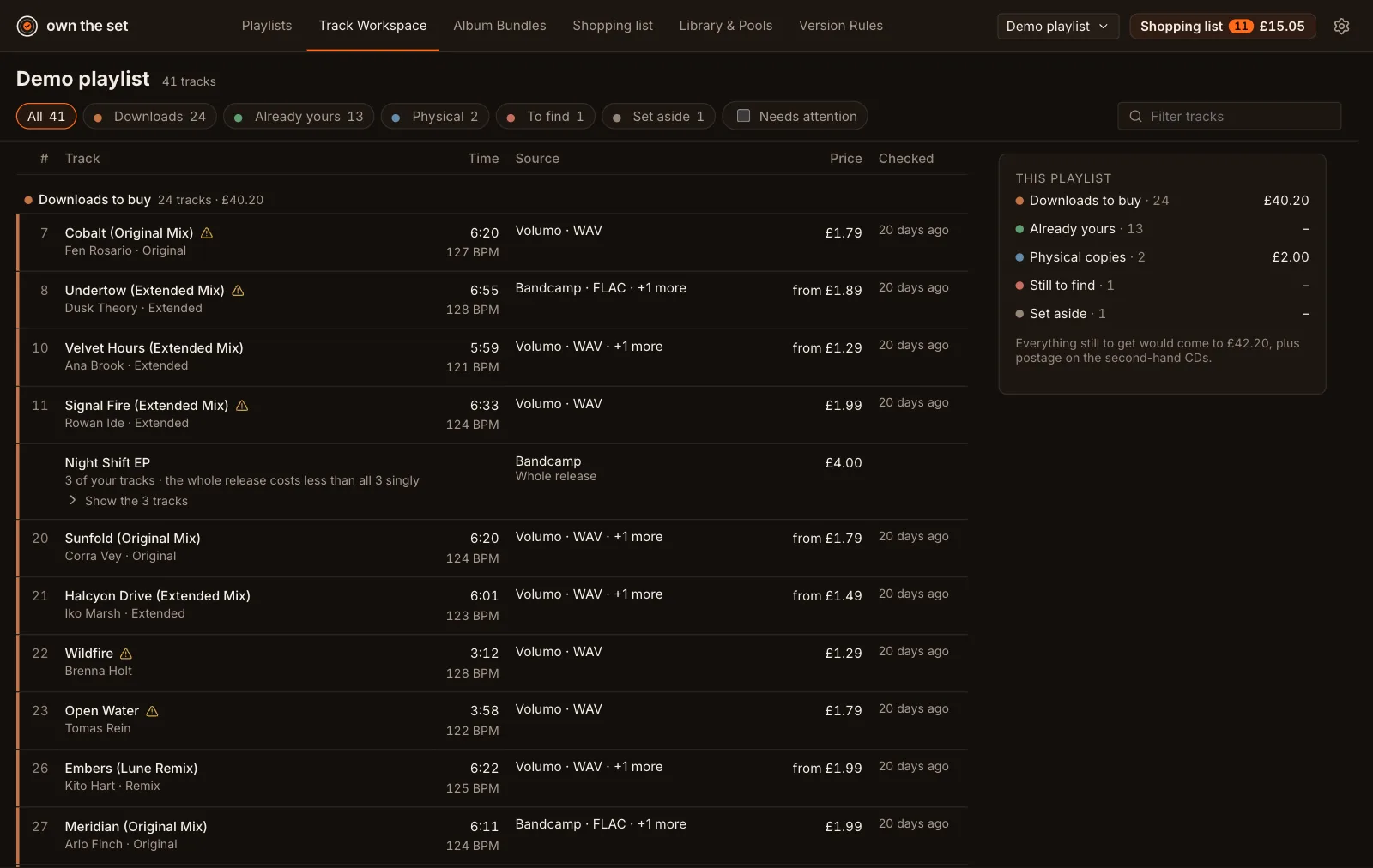
- Filters: All, or one section, from the chips across the top. Needs attention shows the tracks with a decision to make, and Filter tracks finds one by name.
- Sorting: choose the Track, Time, Price or Checked heading to sort each section by it; choose it again to reverse. Your choice is remembered.
- Releases: tracks the plan gets on one release, an EP or a CD, share a row with the release’s price. Show the n tracks opens them beneath.
- Tick tracks to add them to your shopping list with Add n to your list, or to check their prices from the Price check box at the top of the side column. See Checking prices.
- The Shopping list column adds a single track, or shows it’s On your list.
- Open a track to see its page. The arrows at the top step through the list.
- The … menu on a row has Add to playlist…, In other playlists… and remove.
The side column has Price check, Your shopping list, This playlist (its total by section; choose a section to filter to it) and Export missing tracks, which saves a CSV of the tracks stores don’t have: not found, no download in DJ quality, radio edit only, or missing from a store that was checked. The CSV holds track names, versions and ISRCs only, and stays on your computer unless you send it.
Long playlists draw 200 tracks a section, with Show more below. The playlist picker in the top bar switches playlists, and its search finds one by name.