Music folders and DJ software
Open Library & Pools › Library.
Music folders
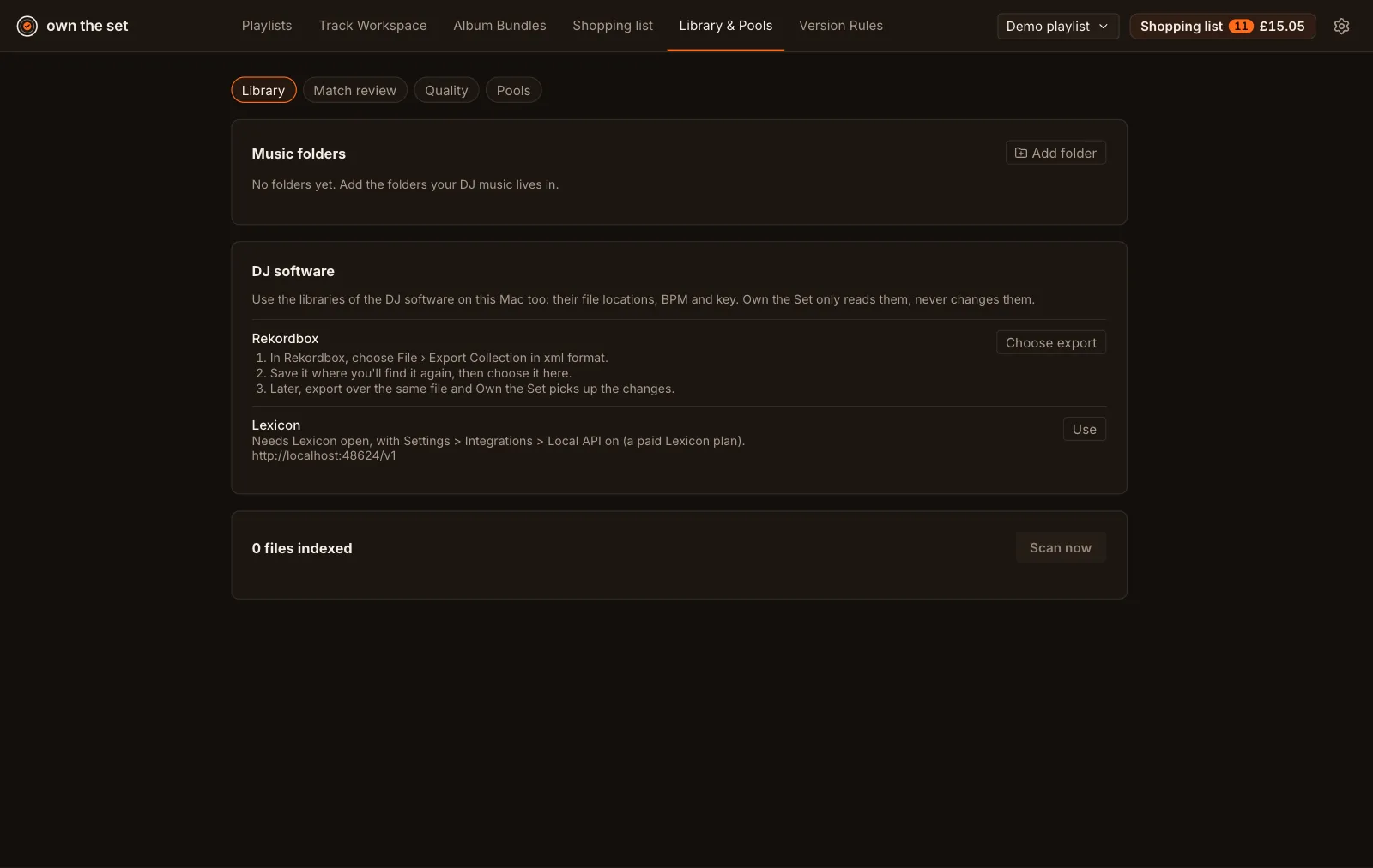
Section titled “Music folders”Choose Add folder for each folder your DJ music lives in, then Scan now. Own the Set reads the files’ tags (artist, title, length, BPM, ISRC, format) and doesn’t change them.
DJ software
Section titled “DJ software”Own the Set looks for Rekordbox, Serato, Traktor, Engine DJ, VirtualDJ, Lexicon and Apple Music in their usual places and lists the ones it finds. Switch on the ones to use. It only reads their libraries, never changes them, and tracks with no audio file (streaming tracks) don’t count.
- Rekordbox: its own database is encrypted, so Own the Set reads an XML export instead. In Rekordbox, choose File › Export Collection in xml format, save it where you’ll find it again, then choose it here. Later, export over the same file. When Rekordbox has been used since the export, a banner says so.
- Lexicon: needs Lexicon open, with Settings › Integrations › Local API on (a paid Lexicon plan).
- Apple Music: its media folder is added to your music folders.
How a file is matched
Section titled “How a file is matched”By ISRC first, then artist, title and length, then artist and title, then title and BPM. Matches that aren’t certain wait in Match review and don’t count as owned until you confirm them.